


Discord Rich Presence daemon for Visual Novels on Linux. Detects games launched via Lutris or Steam, looks them up on VNDB, and shows the title, cover art, and total playtime in your Discord status.
Voice channel
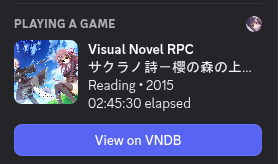
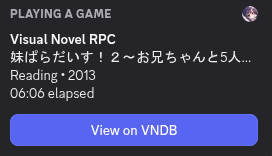
User activity
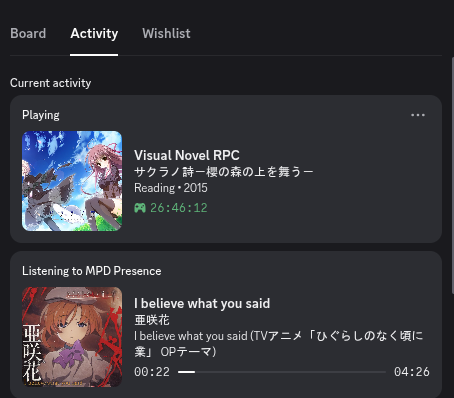
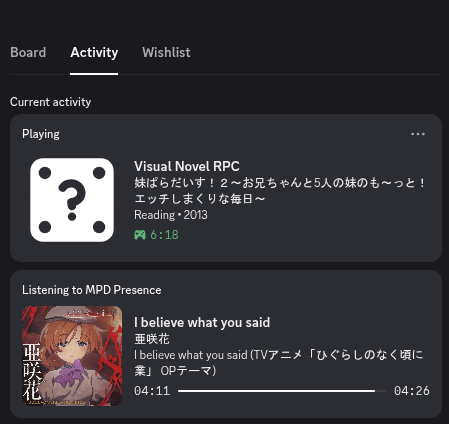
Features
- Detects games from Lutris (exact name from wrapper) and Steam (AppID → ACF → store name)
- Fuzzy title matching against VNDB using trigram similarity + full-width character normalisation
- Fallback: searches the release endpoint and follows the relation back to the parent VN
- Suppresses explicit cover images (sexual ≥ 1.80 or violence ≥ 1.80) — title still shows
- Playtime from Lutris DB (
pga.db) or Steam VDF (localconfig.vdf) — no API key needed - Discord elapsed timer reflects total hours played, not just this session
- Editable
cache.csvfor aliases, hard-links, and SKIP entries — reloaded live while running ignore.txtwith exact-match for short entries (< 4 chars) to prevent false positives likesh
How it works
Main loop
Every 5 seconds the daemon runs detection, debounces the result, checks the cache, queries VNDB if needed, and updates Discord.
Detection
Lutris passes the game name explicitly as command-line arguments after lutris-wrapper, so the name is always exact. Steam injects SteamAppId as an environment variable into every game process — the daemon reads it from /proc/<pid>/environ, then finds the matching .acf file across all Steam library paths (including custom drives read from libraryfolders.vdf).
After all candidates are collected, the daemon reads field 22 (starttime) from each process’s /proc/<pid>/stat. Candidates are then sorted ascending by starttime, so the process that launched first is always tried first during VNDB resolution. This makes multi-candidate priority deterministic and reproducible across polls.
NoteSee the /proc/\[PID\]/stat field reference for a full breakdown of all stat fields.
TipRun with
--verboseto see candidates list in the debug output:
1
2
3
4
5
[DEBUG] src/main.cpp:73 4 game candidate(s) found: [DEBUG] src/main.cpp:75 [lutris] pid=2037324 name="終ノ空 remake" starttime(clock ticks)=4906595 [DEBUG] src/main.cpp:75 [lutris] pid=2086738 name="X-Plane 12" starttime(clock ticks)=4906701 [DEBUG] src/main.cpp:75 [steam-appid] pid=2037822 name="心象天儀本線 ~Per aspera ad astra~ Demo" starttime(clock ticks)=4906857 [DEBUG] src/main.cpp:75 [lutris] pid=2038526 name="サクラノ詩-櫻の森の上を舞う-" starttime(clock ticks)=4907260
VNDB resolution
Before the similarity check, full-width ASCII (!2→!2, (→() is normalised to half-width so Japanese game names from Lutris match VNDB’s stored titles. There is also a substring boost — if the query appears inside the returned title, the score is raised to at least 0.6, handling cases where the detected name is a short prefix of a long VNDB title.
Cache TTL
VNDB results are stored persistently in cache.csv. On each cache hit the daemon compares the entry’s cached_at timestamp against VNDB_CACHE_TTL. If the entry is older than the TTL, it is treated as expired and a fresh VNDB query is issued, updating the stored data and timestamp.
This means ratings, cover images, and release dates in the cache are automatically refreshed over time without any manual intervention. The log line when a re-query fires looks like:
| |
Playtime → Discord elapsed timer
Cache file (cache.csv / cache.db)
Located at ~/.config/vn-discord-rpc/cache.csv (default) or cache.db when CACHE_USE_DB = true. Reloaded automatically whenever the file changes on disk.
| Column | Purpose |
|---|---|
key | Detected Visual Novels name (the search term) |
alias | Redirect this key to a different search term |
vndb_id | v562, v67, SKIP, or empty |
title | Romanised VNDB title (auto-filled) |
alt_title | Original script title, e.g. Japanese (auto-filled) |
image_url | Cover image URL (auto-filled, blank if explicit(sexual or violence)) |
image_sexual | VNDB sexual rating 0–2 (auto-filled) |
image_violence | VNDB violence rating 0–2 (auto-filled) |
rating | VNDB community rating 0–100 (auto-filled) |
released | Release date (auto-filled) |
cached_at | Unix timestamp of last write (auto-filled) |
Examples:
| |
Ignore list (ignore.txt)
Located at ~/.config/vn-discord-rpc/ignore.txt. One entry per line, # for comments. Reloaded automatically while running.
Matching rules:
- Entry < 4 characters: exact match (case-insensitive) — (ie. prevents
shmatchingHigurashi) - Entry ≥ 4 characters: case-insensitive substring match
The default file includes common false-positives: Steam runtimes, Proton, Wine helpers, and launchers.
WarningIf a title has no VNDB match, the daemon automatically adds it to ignore.txt after the first failed query. It will not be retried on subsequent polls. To force a retry, remove the entry from ignore.txt. To permanently suppress it without querying VNDB at all, add a SKIP entry to cache.csv instead.
Configuration (src/config.hpp)
CautionBe caution on changing
IMAGE_SEXUALandIMAGE_VIOLENCEthresholds insrc/config.hpp. Those thresholds are set to1.80(slightly below VNDB’s Explicit level of2.00) because VNDB image ratings are user-reported and may be underrated by a small margin — the 0.20 buffer ensures borderline explicit covers are still suppressed. Raising the threshold above2.00would cause explicit (pornographic) cover art to appear in your Discord status, visible to everyone on your friends list. Displaying explicit content in Discord Rich Presence may violates Discord’s Terms of Service and may result in a permanent account ban.
| Constant | Default | Description |
|---|---|---|
DISCORD_APP_ID | 1482345564698841189 | Discord application ID |
IMAGE_SEXUAL | 1.80 | Maximum threshold value for sexual before being suppressed |
IMAGE_VIOLENCE | 1.80 | Maximum threshold value for violence before being suppressed |
VNDB_MIN_SIMILARITY | 0.35 | Minimum trigram score to accept a match |
POLL_INTERVAL | 5s | How often to scan for running processes |
VNDB_CACHE_TTL | 24h | How long a cache.csv or cache.db entry is valid before re-querying VNDB |
STABLE_TITLE_POLLS | 2 | Polls a title must be stable before acting |
CACHE_USE_DB | false | [Experimental] Use SQLite (cache.db) instead of CSV (cache.csv) |
Building
ImportantInitialise submodules before building — the two header-only dependencies are not downloaded automatically.
1git submodule update --init --recursive
| |
Dependencies
| Library | Purpose |
|---|---|
| discord-presence | Discord Rich Presence (modern C++ rewrite) |
| nlohmann/json | JSON parsing |
| cpp-logger | Logging |
| libcurl | HTTP requests to VNDB API |
| libsqlite3 | Read Lutris playtime database |
Usage
TipRun with
--verboseif a title is not being detected or matched — the debug output shows exactly which process was found, what VNDB returned, and the similarity score.
| |
Launch a game through Lutris or Steam, and the daemon will detect it automatically. Press Ctrl+C to quit cleanly.
File locations
| File | Path |
|---|---|
| Cache (CSV) | ~/.config/vn-discord-rpc/cache.csv |
| Cache (SQLite, experimental) | ~/.config/vn-discord-rpc/cache.db |
| Ignore list | ~/.config/vn-discord-rpc/ignore.txt |
| Lutris DB | ~/.local/share/lutris/pga.db |
| Steam VDF | ~/.local/share/Steam/userdata/<id>/config/localconfig.vdf |